List Process
Modern Marketing is the strategy aligned to buyer needs across all phases of the buying process like Targeting, Engagement, Conversion, Analysis, and Marketing Technology.
List Team plays a vital role in targeting the right audience and engaging the prospects in modern marketing cycle. The team consists of Demand Center managers and Analysts who work closely with their respective regional Sales and Marketing campaign managers to source and build high-quality contact lists to drive engagement, build lead pipelines and ensure optimal revenue results.
Based on the audience requirements for a campaign a list request is raised by the campaign managers and the list analyst is responsible for developing the best possible list to meet the criteria selected.
These lists are primarily compiled from global contact data pulled from the Customer Experience Database (CXD) and then segmented by audience based on specific marketer/campaign/activity need and requirements.

 People
2 |
 Prep time
30 mins |
 Time
10 mins |
 Difficulty
Medium |
STEP 1 - List Process
List requests are raised by marketers via the Global Marketing Shared Services (GMSS) Portal. Below is an illustration of a list request raised in the GMSS Portal.
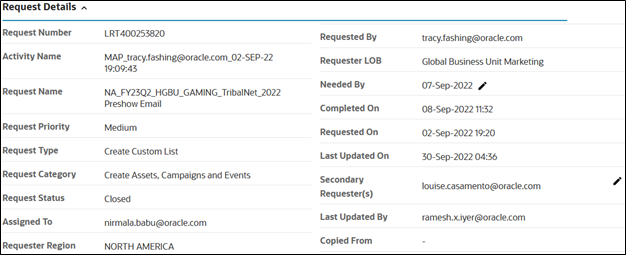
- Request summary – Provides a brief description of the list requirement with specification on the target audience and the parameters required.
- Request priority – Defines the priority or the number of workdays for a request: High (2 workdays), Medium (4 workdays) and Low (7 workdays).
- Needed by – Specifies the date within which the list has to be processed and submitted for approval.
Note
- Per data privacy restrictions, the list analyst can only share the count and the preview contact list - without email IDs - with the requester for approval.
STEP 2 - Marketing Channel
Based on campaign requirements, contacts can be targeted through the following marketing campaign channels.
Email Channel: E-Blast
E-blasts are used to present campaign offers that generate demand and to announce that event registration is open. Tracking parameters are often embedded in the e-blasts to capture responses to the offers.
All e-blast online marketing communications must be sent through the official mass e-mail system (Eloqua) and must be requested through GMSS Portal. This step ensures that:
- Oracle is in compliance with worldwide legislation and includes the required email footer with the relevant unsubscribe link and Oracle’s privacy information.
- Final contact list will have only the validated contacts for Email.
- Each list is checked against a Central Do Not Email (DNE) repository of contact information that syncs with all relevant systems that store contact information.
Note: If you have a contact who is requesting to be opted-out, they need to be added to the Do Not Email (DNE) list immediately.
Phone Channel: Telemarketing and Telesales
Telemarketing vendors use segmented lists to contact potential customers to invite them to events or to offer them Oracle materials in exchange for additional information about their company.
Oracle Sales and Marketing teams are permitted to phone customers and prospects on an opt-in basis. Telemarketing is permitted by the Oracle Sales and Marketing teams for lead pre-qualification, event invitation drives or contact verification and development.
Internal Phone Lists are provided to the marketers either for Sales Team to upload as leads to Oracle Sales Cloud for sales campaigns or for the external tele sales / tele marketing vendors.
Based on the requirement of the phone list whether it is for Internal / External Purposes, the marketer need to fill up the Section Telephone Approval Details as shown below to trigger the appropriate approvals.
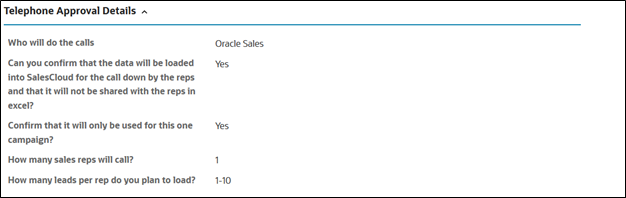
Oracle maintains a central Do Not Call (DNC) repository of contact information that syncs with all relevant systems that store contact information for telemarketing and telesales contacts.
This means that, if a contact has asked to be added to our Do Not Call (DNC) list, we may not call that contact in the future for marketing purposes.
Types of Do Not Call Lists
There are two types of Do Not Call (DNC) lists:
- Oracle Sales DNC Process: When a sales rep or telemarketing agent is asked by a customer not to call again, they must create a contact preference for the telephone number on the contact with preference Do Not and reason code Call – Requested by Party.
- Government (Federal) DNC Process: When a contact places their phone numbers on a Government DNC list, Oracle promptly flags these phone numbers as government (or federal) Do Not Call. If a contact's phone number is included on an applicable government DNC list, we may only call that contact for marketing purposes in response to the individual's explicit request to be contacted by Oracle. We may call a number that is on a DNC list if requested by the individual or for non-marketing purposes, such as billing or customer support.
Postal Channel: Direct Mail
Direct-mail vendors use segmented lists to announce events through postal distribution. Oracle Sales and Marketing teams are permitted to contact our customers and prospects through direct mailers based on their postal permissions.
This means that if a contact has asked not to be added to our direct mailing list, we may not approach that contact in the future for marketing.
STEP 3 - Segmentation Process
Segmentation is the process of defining a specific group of individuals to target for marketing campaign. The group is defined by attribute selection(s) that are then used to create a list.
High Priority Approval
List request raised with needed by day within 1-2 business days is considered as High priority request which requires a high priority approval from the VP.
Over Targeted
Managing the frequency with which we send email communications to our contacts and prospects is a key aspect of email channel management. It is important not to over contact individuals within a given period of time to minimize opt-outs.
Limits are placed on how many marketing emails a contact can receive from Oracle in a rolling 30-day period. This limit is:
- 6 - emails for VP and C-level contacts
- 8 - emails for all other contacts
The process excludes non-marketing emails and emails of the types:
- • Thank You emails
- • Event Reminder emails
- • Newsletter / Blog emails
- • Support emails
- • Oracle Academy emails
- • Emails with By-pass suppression approval from Legal team
Audience Exception Approval Framework
(3rd or 4th Email for same email campaign /12 Month Recency Bypass / Over Targeted Bypass)
Audience Exceptions Approval process and guidelines for
- • 3rd or 4th email sent for the same email campaign
- • 12-month Recency bypass
- • Over Targeted Contacts bypass
is discussed in detail in this section.
Note:
The framework applies ONLY to standard, one-offs campaigns (for ex, invite to a webinar where the marketer would want to send a 3rd email for the same event and include Over targeted contacts too).
The framework does not apply to
- • Nurture campaigns, which by design may have 3 or more emails.
- • Tier 1 events (Dem Gen Campaigns) which may have more emails or exceptional approval (reviewed and approved during the planning phases).
• Email List Size – Threshold Limits
- • There are limits to the total quantity of contacts that can be used for a single email list. These limits and the audience size approvers are as below:
High Focus Accounts
High Focus Accounts are based on the GCP_GLM_ID (Global Customer Programs_Global List Management) value, to identify most important accounts for Oracle.
GCP_GLM_ID will be associated with only selected accounts, which are categorized as Key Accounts(Oracle Tier 1), and Lead Accounts(Oracle Tier 3).
Including contacts belong to these High Focus Accounts in list requires approval from the below approvers for each region.
Partner Contacts
Oracle’s partner ecosystem is critical to our customers’ success. Their differentiated services, combined with Oracle’s technology, help enable our customers to achieve their business goals.
Oracle Partner contacts are protected which requires approval from partneroutreach-approval_ww@oracle.com to include in the contact lists.
Contact Recency
Recency is a measure of a user’s last activity. This could be in the form of a MyProfile account creation/update, any response (Landing Pad, Event, etc), or subscription changes. Recency is an integral requirement for most segments in Marketing.
Today, the sources for the various activities are as follows:
- • MyProfile account creations/updates
- • Partner registrations (via MyProfile)
- • Event/Landing Pad responses (Certain, Eloqua, GCM or Fusion)
- • Subscription/un-subscriptions/Opt-Ins/Opt-Outs (MyProfile, Eloqua, GCM, Fusion)
Lists are restricted to 12 months recency by default.
Protected Audiences
Protected audiences with custom criteria created for individual business units or teams so they can manage messaging communications to their most valuable audience. When other lists are requested that include these protected audiences, the requester will need to get approval from the audience owner.
The request and approval process is incorporated in the current List Request process and portal will automatically trigger an approval based on the title or department selected in Unity Segment or Portal Request.
Each region has its own criteria to define their protected audiences and approvers.
Download the excel sheet from below icon to know about the approvers for each region.
Bypass Suppression
Contacts opted out from receiving emails will be suppressed by internal process while filtering out the valid emailable contacts.
To include those contacts in few exceptional cases like critical patch updates, Thank you emails etc., the question “Do you want your email to bypass suppression?” can be answered as ‘Yes’ while raising the request in GMSS portal which will trigger an approval to privacy team to bypass the suppressed contacts.
For Privacy Team approvals please write to: bypass-dne_ww_grp@oracle.com
Personal Identifiable Information
Personally Identifiable Information (PII) , is any piece of information or data that could identify a person.
Example - Email Id , Phone Number or any other personal details of a contact like Address.
Request Summary section in a GMSS Portal
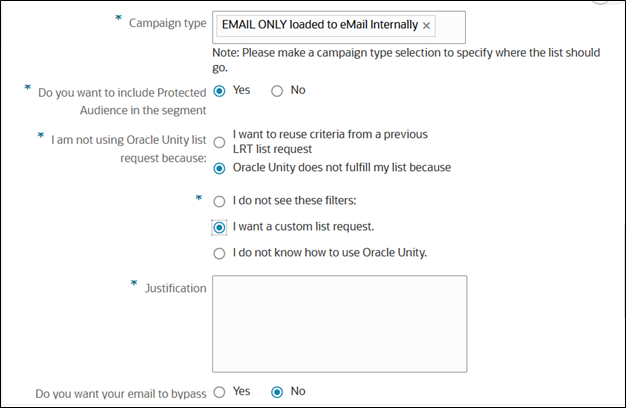
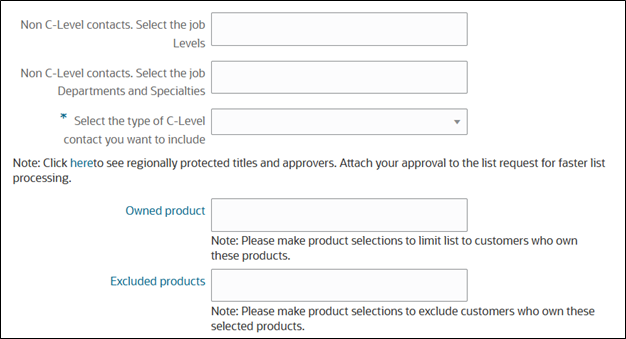
An example of list criteria:
- All contacts from AUSTRIA who are not on the DNE list
- Contacts who are active in the last 12 months
- Contacts have title of Manager, Senior Professional from technology department
The attributes of the request (such as mapped title, contact status, region and customers) would determine whether a contact qualifies for the segment for email/phone/postal channel. The output of segmentation is a list.
Overall layout of the request is defined in three sections which focus on different types of segmentation data.
- Global Defaults Section contains the segmentation attributes that apply to the entire set of contacts generated. This includes criteria like geography, region or country type selections that the list targets to a specific area. Additionally, depending on the type of campaign some or all of the global suppression rules will be applied, such as Opt In/Out Legal Requirements, Telephone Do Not Call, Over-Target Restrictions.
- Standard List Details Section deals with the types of attributes that defines the base universe of the contact list. Each attribute selected here will be treated as an AND condition meaning that must meet all conditions specified to be selected for this list such as titles, industry, install base or company sizing data.
- Enhanced List Details Section deals with attributes which will be treated as an OR condition to bring in additional contacts based on their digital body language such as topic score.
STEP 4 - Types of Lists
Internal Lists are categorized based on the list sources and marketing and sales initiatives.
The List Management team in IDC helps to create a number of different types of internal list for email campaigns, phone or direct mail.
Internal list requests are high-quality contact lists that support Marketing and Sales initiatives. These initiatives may include email, direct mail, and telemarketing campaigns. These lists align with the criteria and volume requirements set by the campaign manager to optimize audience targeting and revenue realization. Internal list requests are for the segmentation of contacts and/or prospects from the customer experience database (CXD). In some cases, individual records from external list sources are supplemented with internal lists.
Internal List Requests in GMSS portal can be created either as LRT request or as an OUL request.
List types include:
- Contact permission verification (CPV)
- Standard list request (LRT) or (OUL)
- Non-standard list request (Nurture Request , Re-Engagement, Re-Activation etc.,)
- Social Media Request
Contact Permission Verification
For a contact permission verification (CPV) request, the requester provides a list of contacts that are collected through different data sources. The list data has to be checked for contact validity to build a highly qualified list. Checking for contact validity means identifying contacts that are duplicates, suppressed (Do Not Email) or bounced, as well as contacts that match CXD records.
List Team verifies the contact list uploaded by the marketer and provides a report on the number of contacts that can be used for a campaign.
All Phone and postal verifications must be requested via the GMSS Portal and include the request service type as Contact Permission Verification and the campaign type as PHONE-ONLY or POSTAL-ONLY.
Things to know about CPV request
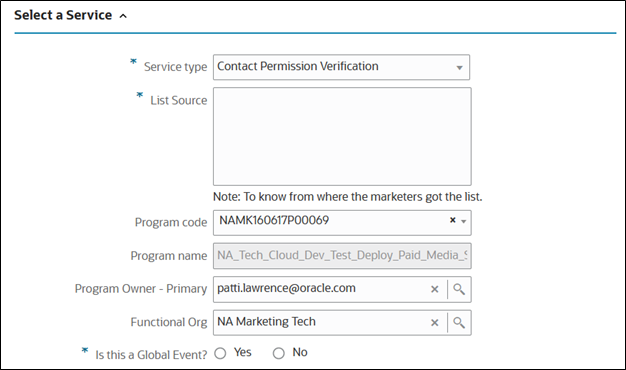
In the GMSS Portal, the Service type will read Contact Permission Verification and Campaign type will read "EMAIL ONLY loaded to email Internally" in the Target Audience list request form.
You need to ensure that the requester has arranged the list contact data in the appropriate columns, as per the template provided in portal , as shown below.
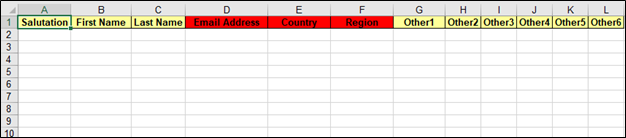
- The CPV list that is to be processed should be uploaded by requesters in .csv format.
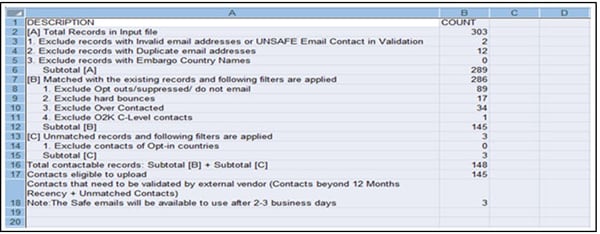
- An illustration of the report generated on the processed file (called the waterfall report) after applying various filters is as follows:
- In case the email list is not used for an actual email campaign, but only to verify the contact list for future use, then the role of list analyst ends by providing just preview list.
- But in case the list is to be used for an email campaign, then the marketer associates the CPV list with an Email (SEV) or Newsletter (NSL) request. This list is later uploaded to Eloqua by the list analyst.
Standard List Request
Standard list requests are simple list requests with standard criteria, like titles, topic scores or industries, for one or more countries. Based on the selected criteria, the GMSS team will generate the script along with preview list. In the GMSS Portal request, the activity selected is Standalone Email, Phone or Portal.
- The list attributes (like product details, topic score, Persona, Recency and others, need to be filled in the questionnaire as per the campaign requirement) which would appear as below:
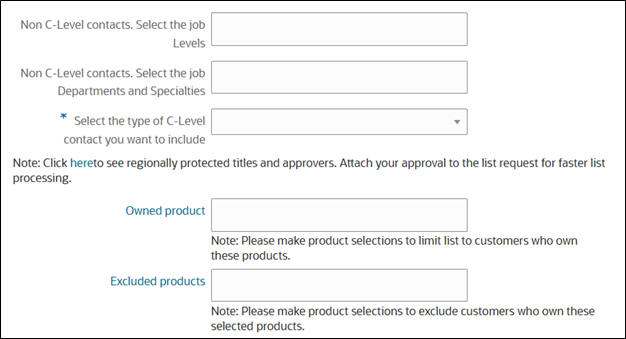
- The GMSS Portal Generated Segmentation tool will generate the estimated count based on the attributes selected in request.
- For simple standard list requests, the list requester MUST review the summary to determine if the count will be sufficient for his or her needs, and then communicate to the list management team via the GMSS Portal for updates or approvals. This step ensures that the requester receives the expected list size prior to the list being finalized and delivered.
- For Unity Based List requests, Marketers need to define their criteria in the Unity Segmentation tool and associate the segment details in GMSS Portal and raise a List request of type OUL.
- GMSS Portal initiates the approvals for protected audience contacts, threshold count approvals, high focus account approvals
Non-Standard List Request
Non-standard list requests are more complex than standard list requests. For these requests, the marketer works with the list analyst to define the business requirements, and then the list analyst analyzes and advocates the best possible solution to meet the business needs. The list analyst then develops SQL scripts to fetch contacts from the back-end tables and generates the preview list and count summary for the requester. On approval of the preview list, the list analyst associates the email list to the respective campaign and creates a segment in Eloqua.
For non-standard list requests, the list analyst executes a region-specific standard script to generate count and preview lists, based on the attributes selected in the GMSS Portal request.
All Modern Marketing Campaigns like Nurture, Re-Engagement, Re-Activation lists requests and requests with special requirements for Multi-Touch and Transactional Campaigns will come under this category.
Social Media Request (OSN)
Social Media list request helps in connecting social platforms like Linkedin and Facebook to Eloqua for marketers to follow when creating lead Gen Ads on Facebook and LinkedIn. The steps enable leads flow directly from social platforms to Eloqua.
Raising a GMSS request will happen after submission of a digital campaign submission form to the agency and agency confirms the lead form that has been built on social platform.
Related Topics
Nailed it?
If yes, click below to confirm completion of this topic.
Yes, I have understood this topic well
