Nurture Segmentation
What is a Nurture Campaign?
Nurture Campaign is Behavioral Based Emails. Lead Nurturing is a series of emails that get sent based on the leads behavior. A lead nurturing campaign is where we are using the data gathered from the user's behavior to deliver timed and targeted information that will help guide the prospect through the buying process.
This process helps in developing relationships with buyers at every stage of the sales funnel, and through every step of the buyer's journey. It focuses marketing and communication efforts on listening to the needs of prospects, and providing the information and answers they need.
- Why Is Nurturing Important
- Nurture Audience Segmentation
- Nurture Campaign Flow
- Nurture Post Launch Actions

 People
2 |
 Prep time
30 mins |
 Time
10 mins |
 Difficulty
Medium |
STEP 1 - Why Is Nurturing Important
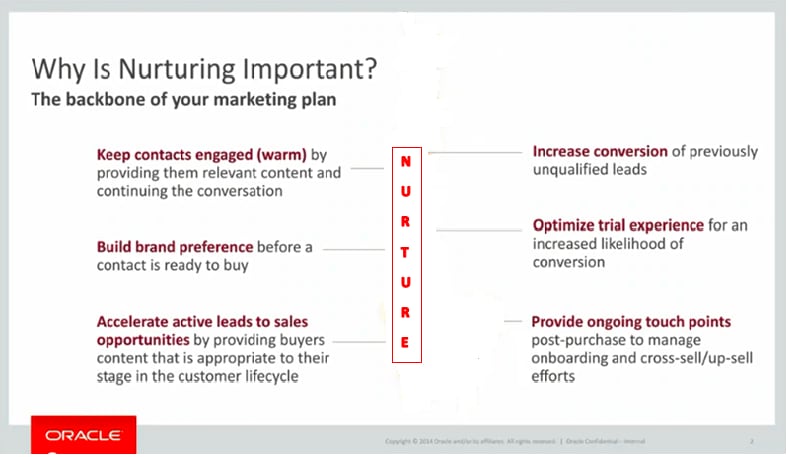
There are many moving parts in developing a nurture campaign, and it requires an up-front planning.
The simplified overview of the entire nurture process is broken down into multiple phases like
- Planning & Prioritization
- Preparation & Requirements Gathering
- Segmentation and Technical Review
- Asset Production
- Campaign Build, QA & UAT
- Reporting & Measurement
- Post-Launch Monitoring
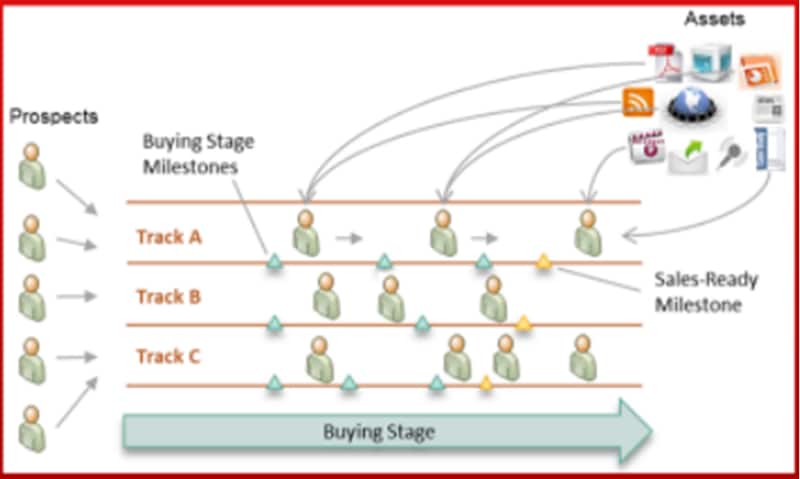
Planning prerequisites of the content, target audience and sales readiness assessment process will make the nurture campaign planning process much easier.
Here Let us concentrate more on the segmentation process of Nurture Campaigns.
STEP 2 - Nurture Audience Segmentation
Audience Segmentation is vital to any successful campaign. Audience segmentation of nurture criteria is based on the following areas.
- To identify contacts with interest in nurture campaign topics
- Topic score hierarchy – to determine if hierarchy has been set up or is in process
- With Industry-specific interest (identify related industries if applicable)
- To Identify lead score model that will be leveraged
- To Identify and map previous and active program/campaign codes to automatically “feed” specific nurture campaigns
- And with Review to title mapping table - key LOBs and specialties
Segmentation requirements for the nurture campaigns are finalized during the preparation & requirements gathering phase by the marketers / campaign owners and raised as a normal list request with the keyword Nurture in the program name with details.
Nurture Segmentation can be currently processed in two different ways depending on the complexity.
Nurtures with no order of execution:
Nurtures with simple criteria or nurtures which does not involve multiple segments with the priority of execution can be processed through Unity.
Final lists of these nurtures will be directly synced to Eloqua through Unity using recurring Campaign jobs.
Nurtures with order of execution:
Nurtures which involve multiple segments with the priority order of execution can be raised as LRT request with the criteria filled using an excel template.
For more details on the Nurture segmentation and processing kindly visit the below confluence page:
https://confluence.oraclecorp.com/confluence/display/GMAAS/Types+of+List+Request#CampaignSpecific
STEP 3 - Nurture Campaign Flow
Nurture Campaign flow is finalized during the preparation & requirements gathering phase by the marketers and campaign owners and raised as a MCC request in GMSS portal with the same program code and program name as the List Request and SEV request.
Nurture Campaign flow is uploaded in the form of a PDF file or as a visio flow diagram in Template Builder.
Sample Campaign Flow Diagram:
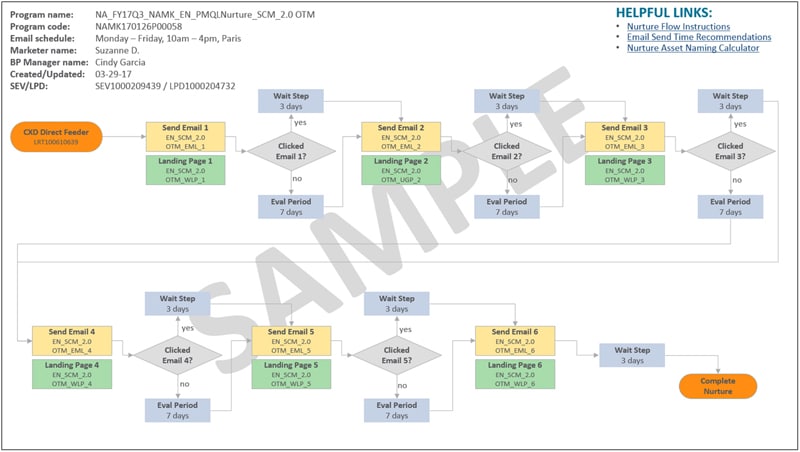
List Analyst works on the nurture flow based on the visio flow provided for the campaign and get it approved by the marketer / campaign owner and also send it for Quality Analysis by QA team for approval.
Once we receive final approvals of List Counts, Nurture Campaign Flow and Nurture Assets with Nurture Manager, Delivery Team, and List Analyst for Launch, the campaign requirements and flow are finalized and we are ready to start with the nurture campaign flow.
Nurture Execution:
Nurture Execution starts with uploading the dynamic shared list, creating segment and associating the segments with the campaign asset followed by campaign settings.
Important Points to keep in mind during the Nurture Campaign Setting:
- Check "Add members hourly until the campaign is deactivated" option while selecting the segment member asset in canvas.
- Go to Setting > uncheck the option "Allow contacts to enter the campaign more than once".
- Go to Setting > Activation > Change the Time zone and End date according to the nurture flow diagram provided.
- Double check the Flow, Evaluation period, Wait period and Email Assets association.
- Change the Scheduling of all email assets according to nurture flow diagram.
- Get Email Asset convention File from DM team who worked on Email Assets.
- Flow should be reviewed by internal team members.
- Get the canvas reviewed by marketer before proceeding for final launch.
- After final approval of MCC and LRT by the marketers and review team members, raise DQA [Quality Analysis] request with the Segment details & campaign flow.
- ACTIVATE the campaign ONLY after getting approval from QA [IDC], Marketers, DM team [IDC], Reviewers in the form of Email.
- Update LRT & MCC with Activation details and Change the status to "APPROVED“.
- After campaign activation the notification mail is sent to all the stakeholders of the nurture with the campaign name, segment and shared list name details with counts and update the MCC request and LRT request with the nurture launch details.
- Please note the dynamic shared list uploaded in the shared list application should be given enough time between package execution and Eloqua sync program.
- Schedule the shared list execution in the suggested time interval and give the end date as: ‘atleast 10 years from current date’.
STEP 4 - Nurture Post Launch Actions
Once the campaign is activated the nurture package is setup in Nurture Schema by respective leads and jobs created to automate the package using DBMS_SCHEDULAR package.
As part of the nurture automation the following details are to be updated in the respective tables after each nurture activation and all the nurture related reports are to be watched vigilantly. Please monitor the active nurtures at least for full cycle.
Nurture Monitoring : Nurture Daily Status Report
For Nurture Daily Status monitoring, segmentation analysts need to update the values in CX_SEG_TOOL.GLOBAL_NURTURE_DETAILS table.
| NURTURE | Nurture Region Eg: APAC NURTURE / LAD NURTURE / EMEA NURTURE / NA NURTURE / JAPAN NURTURE / GLOBAL NURTURE |
| NURTURE_NAME | Name of the Nurture Eg: LAD FY25 FINANCE NURTURE / NA FY25 CX SERVICE HIGHER ED NURTURE |
| SHARED_LIST_NAME | Name of the Shared list as per the naming convention Eg: OULxxxx_XXX_XXX |
| PROGRAM_NAME | To be filled based on details from GMSS Portal |
| LIST_REQ_NUMBER | OULxxxx / LRTxxxx |
| EMAIL_REQ_NUMBER | SEVxxxx |
| ASSIGNED_TO | List Analyst Name - Assigned |
| PROGRAM_CODE | To be filled based on details from GMSS Portal |
| CAMPAIGN_CODE | To be filled based on details from GMSS Portal |
| CAMPAIGN_NAME | To be filled based on details from GMSS Portal |
| NURTURE_START_DATE_OLD | Can be left blank for both LRT and OUL nurtures |
| NURTURE_NAME_PARAM | Valid Only for LRT SR's – For Unity Nurtures this can be left blank |
| MODIFIED_NURTURE_NAME | Valid Only for LRT SR's – For Unity Nurtures this can be left blank |
| PACKAGE_NAME | Valid Only for LRT SR's – For Unity Nurtures this can be left blank |
| PACKAGE_LOCATION | CX_NURTURE_CAMPAIGN Valid Only for LRT SR's – For Unity Nurtures this can be left blank |
| NURTURE_RETIRE_REASON | This can be left blank for both LRT and Unity Nurtures. This needs to be filled while decommissioning the Nurture. |
| NURTURE_START_DATE | Nurture Activation Date |
| ELOQUA_EMAIL_ASSET_ID | Last Email Asset ID |
| ELOQUA_EMAIL_ASSET_COUNTS | Can be left blank for both LRT and OUL nurtures |
| SCHEDULER_JOB_NAME | Valid Only for LRT SR's – For Unity Nurtures this can be left blank |
| NURTURE_PRIORITY | Can be left blank for both LRT and OUL nurtures |
| FREQUENCY_DAYS | Number of days the nurture contacts are getting synched in a week |
| BASE_TABLE_NAME | Valid Only for LRT SR's – For Unity Nurtures this can be left blank |
| NURTURE_END_DATE | To be filled on Nurture Retiring Date |
| UNITY_NURTURE | Y or N |
| FIRST_EMAIL_ASSET_ID | Nurture First Email Asset ID |
Nurture Reports to be watched every day to monitor:
- Daily Nurture Alert Report: This report gives the counts synced in Eloqua through respective shared list after everyday execution of the package.
- Nurtures Error Out Report: This report gives the details of the nurtures which are not scheduled or shows the error for the nurture execution of the active packages.
Important Nurture Tables to Remember:
- Nurture Parameter Table:
CX_SEG_TOOL.LM_NURTURE_PARAMS - Shared List Table:
CX_TRIGGER_CAMPAIGN.CXD_SHARED_CONTACT_STATUS_VW - Nurture Control Table:
CX_SEG_TOOL.LM_NURTURE_CONTROL - Daily feed Report(Prakash):
CX_SEG_TOOL.GLOBAL_NURTURE_DETAILS - Final table with source of the contact:
CX_NURTURE_CAMPAIGN.LM_NURTURE_INCLUDE
Related Topics
Nailed it?
If yes, click below to confirm completion of this topic.
Yes, I have understood this topic well
