Cancel/Reschedule an Email
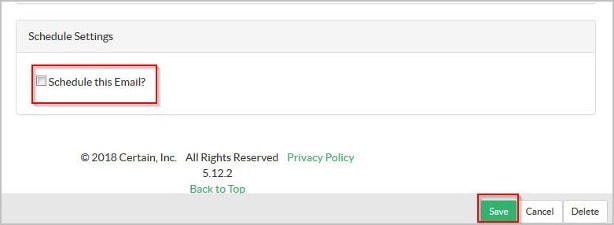
Each time an user edits/opens an already scheduled email, Certain system has "Schedule an email?" auto selected & email trigger time is set to 1 day before event by default. Hence, when an email is saved without unchecking the "Schedule an email?", the email is automatically triggered.
Certain team is working to remove the auto selection of "Schedule an email?" check box.
Until this issue is fixed, here is the best practice we suggest while cancelling/rescheduling an email.

 People
3 - 6 |
 Prep time
5 min |
 Time
30 min |
 Difficulty
Easy |
Workflow
STEP 1 - Remove a Scheduled Email (5 min)
- To remove an email from Scheduled Emails queue
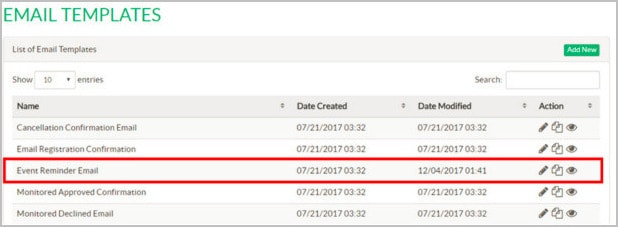
- Navigate to "Email Templates" and access the email which you want to have removed from Scheduled Email.
- Uncheck the box beside Schedule this email? and Click Save.
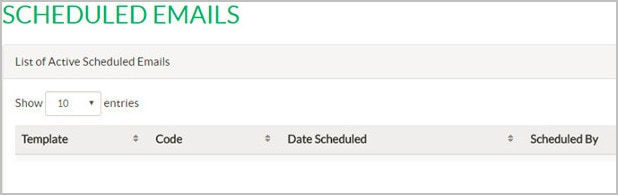
- Cross -Verify if this email is been removed from the Scheduled emails queue.
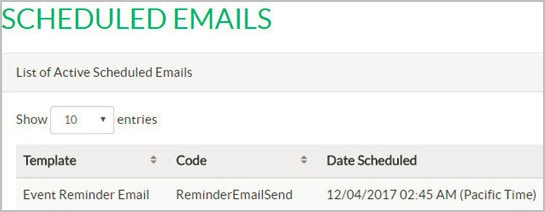
Note- Do not cancel on the schdule emails tab.
Related Topics
Nailed it?
If yes, click below to confirm completion of this topic.
Yes, I have understood this topic well
