Send Time Optimization
Send Time Optimization allows marketers to send emails at the optimal time for each contact. It helps marketers engage more effectively with contacts, gaining contacts' attention when they are historically most attentive to their emails.
In this section you will learn:
- Send Times
- Good to Know (best practices)
- How to identify request
- Enable send time optimization

 People
3 |
 Prep time
15 min |
 Time
1.5 h |
 Difficulty
Easy |
Send Times& Good to Know (best practices)
Send Times
The optimal time for a contact is the time they are most likely to open an email based on historical data of their email open times. If marketers enable Send Time Optimization for an Email step in the Campaign Canvas, the email will send in the hour around that contact's optimal time. The email is sent within the week of email initiation.
Good to know (best practices)
- New recipients have no historical data, so emails enabled with Send Time Optimization will send immediately after the campaign has been activated. Future emails will adjust send times based on new data collected from that first email.
- Batch-type campaigns are the ideal fit for Send Time Optimization. Time sensitive emails such as webinars or event registrations are not as ideal because a contact's optimal time could be after these events, or too close to a sign up deadline.
- Scheduling is not available for Send Time Optimization, as it is designed to determine optimal times for each individual user.
- Users don’t need to use the Break send into smaller batches setting while using Send Time Optimization because Send Time Optimization analyzes contact data for the most optimal time to send the email. It will already break down the batch by default into multiple different time slots.
How to identify request
Email Request
You can identify the following comments in the Email request.
Please Duplicate this Email to create “Email A” and “Email B-STO”
“Hi GMSS, we are working with Marketing Operations (added as secondary requester) on an STO (Send Time Optimization) Eloqua pilot project. We require this email to be duplicated so that an A/B test can be conducted.
Please add “EML-A” and “EML-B-STO” to the naming conventions of the emails once exported to Eloqua. Please also provide the Eloqua email names here in the comments so that Marketing Operations has this information handy. This request will require you to proceed as you normally would with building the emails out, just creating a duplicate.
Once emails are approved the emails will be associated to 2 lists that are requested in the List Request#. Please reach out to Mary Ann McKinnon for further clarification should you require any.”
List Request
You can identify the following comments in the Email request.
Please also associate list1 with Email A (EML-A) and list2-STO with Email-B-STO (EML-B-STO)
“Hi GMSS, we are working with Marketing Operations (added as secondary requester) on an STO (Send Time Optimization) Eloqua pilot project. Are you able to deliver the list in 2 spreadsheets so that the A/B testing can be done in Eloqua? We will require 2 segments split in half at random so that the testing can take place. Therefore, this request will have 2 separate lists that will be associated to 2 email versions for testing. Please reach out to Mary Ann McKinnon for further clarification should you require any.”
Once emails are approved the emails will be associated to 2 lists that are requested in List Request#. Please reach out to Mary Ann McKinnon for further clarification should you require any.”
PRO TIP
List splitting is not a requirement, but it helps marketers to know if it is wise to apply STO to their audience or not. Some audiences might not make sense if we have little to no data on them.
STEP 2 - Enable send time optimization
1. Login to Eloqua.
2. Go the Eloqua Canvas
3. Drag and Drop the Segment member under Audience and Email under Asset section
4. Associate the respective segment & Associate the Email assets
5. Open a Email scheduling tab & Select Enable Send Time Optimization from the Mode drop-down.
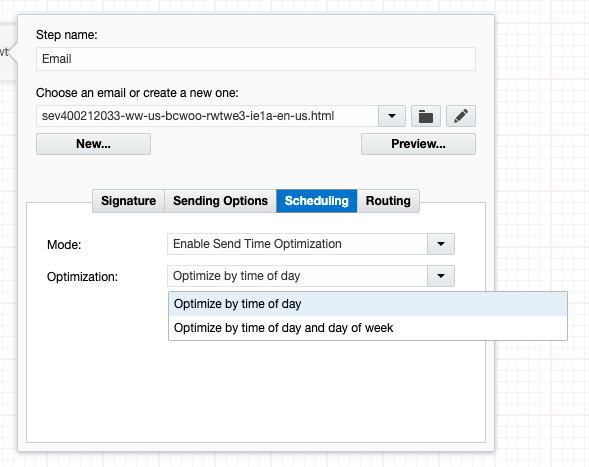
Configure the following option:
- Optimization: Select whether to Optimize by time of day or Optimize by time of day and day of week when sending the email. With Optimize by time of day, a contact will receive emails at the optimal time of day, regardless of what day they receive it on. With Optimize by time of day and day of week, Eloqua will determine which combination of time of day and day of week is optimal for each contact.
PRO TIP
-
Related Topics
Nailed it?
If yes, click below to confirm completion of this topic.
Yes, I have understood this topic well

