Shipping Address Capture for Sending Gifts
Capturing the shipping address using custom questions in the Progressive Profile Form sends the address as lead notes to sales. To overcome this situation, it has been advised to use the CIF form for this purpose. This way, the shipping address will not be exposed to sales.

Workflow
Guidelines to enable shipping address
A few use cases have been shared below for your reference. Follow the steps to create a CIF form to capture the shipping address for sending gifts based on requirement.
Steps:
- Duplicate the master CIF form and do the changes based on the requirement.
- Update Contacts – With Custom Values and ensure the following values has been selected and enabled for No Lead flow
- Update Contact with Form data – process steps should be modified. Donot map these (shipping address feilds like Address, City, State, Phone number, zip code. Note- Country and other fields can be mapped.) will help not to flow to CXD.
- Description (why are we creating the form?) should be added, which helps customer to understand purpose of their data capture.
- Save the form into Local regional folder.
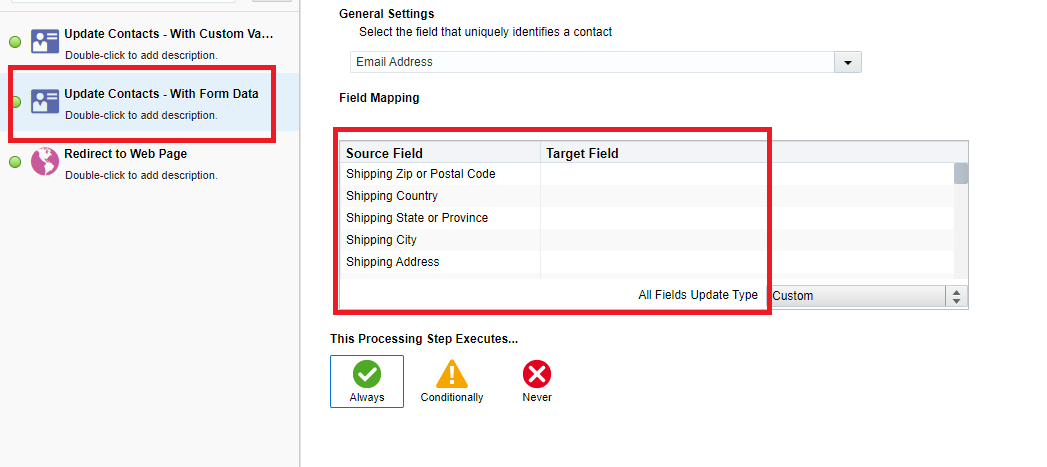
- Append the CIF form html code to CIF master template (landing page). Follow the CIF playbook page to know how to create a CIF form.
- Share to requester.
| Contact Field | Update Type | Value |
|---|---|---|
| Last Form Submit Date | Apply date stamp | |
| Last Submitted Form Name | Set to value | <to be left blank> |
| Salesperson | Set to value | <to be left blank> |
| Registrant No Lead Flow | Set to value | <to be left blank> |
| Response Type | Set to value | <to be left blank> |
Is Response |
Set to value |
0 |
Reference links:
go.oracle.com/LP=106874?elqCampaignId=286235
go.oracle.com/LP=106994?elqCampaignId=260875
Note: If there is a requirement to provide event registration data then, Request Shipping Address List for M&D Fulfillment - Custom List. Follow the procedure as per the confluence page.
Related Topics
Nailed it?
If yes, click below to confirm completion of this topic.
Yes, I have understood this topic well
