QA Process
Quality Assurance Team is complementary subset of the larger Digital Marketing Services Team; facilitating from India (IDC), Philippines (Manila) and Colombia (LAD) catering across the time zones. Quality is of utmost importance to the Company, so we collabrate closely with the Campaign Production team, Project Management team, Production Design&Development and Solution Archieture teams to achieve a common goal i.e. delivering a product that goes out of Oracle system is error free, Oracle Standard compliant and meets the requisites set and readiness of marketing tools.

QA Process Workflow
Workflow
Let us see the workflow of QA review process for any requests
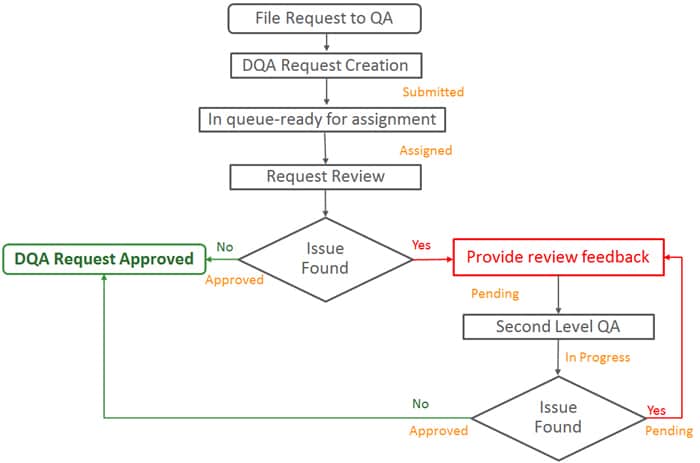
Definitions:
- File Request to QA: Once the asset is ready for review, file the request to QA (refer to Guidance to New Hire to file request).
- DQA Request Creation: this is auto-created by Request Portal
- Request Review: Review process begins, action taken by QA team
- Provide review feedback: feedback on the request from QA team to Production team
- Second Level QA: QA team reviewing the request in the second iteration
- DQA Request Approved: Sign-off from QA team on the request
Please find more information in the video tutorial: https://otube.oracle.com/media/Introducing+QA+Team+and+Review+Process/0_ieopazmk/102044782
Guidance to New Hire
This will briefly provide you the steps on how to submit a request for quality review along with change of statuses based on various actions performed by both QA and Production Teams. This will also give you instructions on mandatory details that you will have to furnish before QA submission.
How do I file a request for QA review?
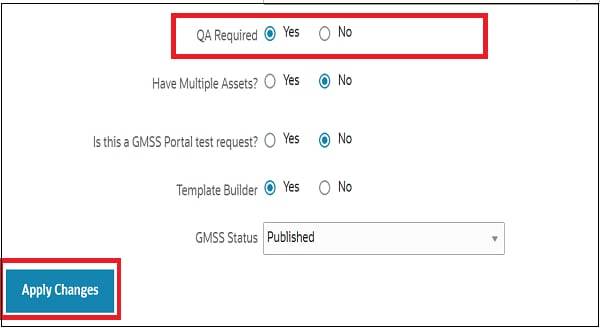
- Click on the GMSS Edit section from the request which you want to submit for QA, Edit section gets expanded
- You will find a question QA Required, to which you select Yes and click on Apply Changes.
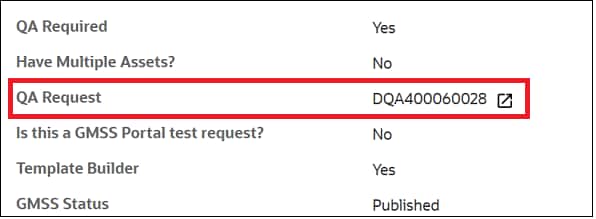
- Demand Marketing QA is generated under Additional Details.
- Click on the DQA request number which is auto-generated and allow a new window to open
- Click on the Update Request from the Request Details ribbon
- Update all the required information in Comments box and click on Apply changes

How does the QA team know about my submitted request?
The new request will be in the Submitted queue of the QA team, and an auto-response mail will be triggered to the group ID of the QA team and the production analyst.
What information is available in the DQA request?
Click the DQA request number. A new window opens with the details of the DQA request. (See the Request number, Request name, Request status and Associate Request highlighted below.)
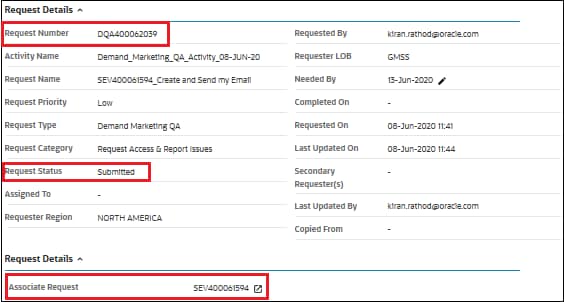
Once the DQA request is assigned to a QA analyst, an auto-generated mail is triggered to the QA assignee and production assignee.
How will I know when my DQA request is back in my queue?
- Click the home icon in the GMSS portal.
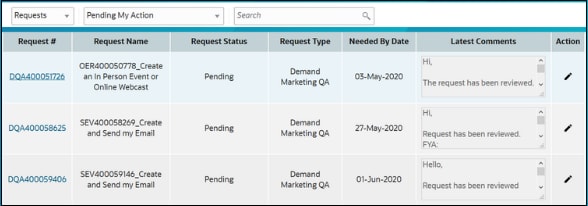
- On the home page, select Pending My Action from the Existing Requests list, shown below.
The pending DQA requests that require your action will appear.
After fixing the issues, how can I resubmit the request to QA for validation?
- Click the DQA request in your pending action list. You will find comments from the QA analyst in the Comments log section.
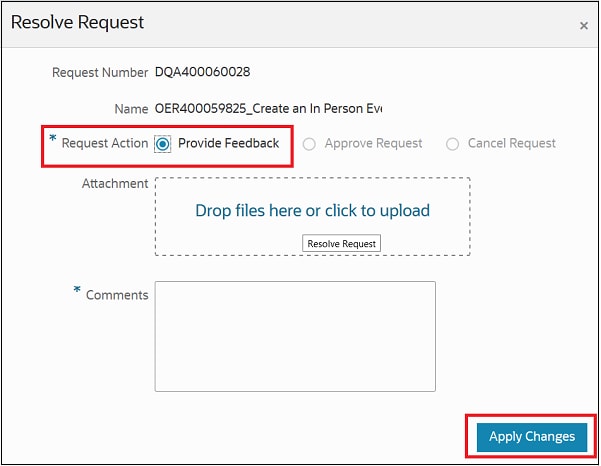
- Click Update Request (shown below) in the Request Details ribbon of the DQA request.
- In the pop-up window, select Provide Feedback under Request Action, shown below.
The request is sent back to the QA team for the validation, with the status changed to In-Progress which is flown to QA queue.
What information is required for the QA team to proceed with a review?
Necessary information* to be provided to QA team to proceed with review
*Information required:
- SEV: Email subject line
- SEO: Sales Evite URL
- OER: Event URL
- LPD: Landing Page URL
- MCC: All necessary documents
- Notes: (if any) to QA’s attention
What are the statuses used by the QA team and their related action items?
The QA team will take action on the request and post comments in the DQA request. See the table below for a list of statuses and the associated team members.
| Status | Description | Actioned By |
|---|---|---|
| Submitted | New request created for QA | Production Analyst |
| Assigned | DQA request is assigned to QA Analyst | QA Lead / Manager |
| Pending | QA assignee has feedback for the Production Analyst | QA Analyst |
| In-Progress | Production Analyst routing back to QA team for feedback | Production Analyst |
| Approved | Request has been approved; no further feedback/comment from QA Analyst to the Production Analyst | QA Analyst |
Please find more information in the video tutorial: https://otube.oracle.com/media/Introducing+QA+Team+and+Review+Process/0_zzxsq8h4
QA Process for High Priority Requests
We’ve tried to answer every question we think you could have concerning QA approval on urgent publishing, activation or launch of assets. If you still have any questions, please feel free to contact us.
1. How to alert QA team on my high priority requests?
You are required to send an email to the QA distribution list (gmss-wqa_in_grp@oracle.com), with the subject line clearly marked as High Priority along with the respective request number. Please ensure your manager/team lead copied on the email.
Here is the sample for your reference - High Priority: DQA123456789-SEV234622212
2. What can I expect after my priority mail is sent?
You will receive a reply from the QA Analyst at the earliest, confirming that the request has been assigned and the review is in progress. You will also be notified through the same email thread of any status changes once the QA review is completed.
3. What are the criteria to raise DQA request as high priority?
Email:
- The email is scheduled to be launched within the next few hours; however, the DQA request is still in a ‘Submitted’ status.
- Request is not actioned by QA for more than 2 days after submission
- DQA is not QA approved but LRE/LRT is approved and email is ready for launch
Events:
- The event request is approved to be published by the marketer but awaiting QA approval
- DQA request is in submitted status for more than 3 days
Sales Evite:
- Approved by requester to activate but awaiting QA approval
- Request is not actioned by QA for more than 3 days
Landing Page:
- Approved by requester to activate but awaiting QA approval
- Request is not actioned by QA for 3 days
Please note that QA will not perform its action on high-priority review if DQA is in Pending
For any other QA related queries, please write to us at gmss-wqa_in_grp@oracle.com
4. Unable to comment on my Peer's request, how do I proceed
Send an email to QA team for their action or inform team lead to change the status and provide requied information.
Paid Search FAQs
Below are some frequently asked questions (FAQs) regarding potential use cases that might arise during execution process and the subsequent steps to take.
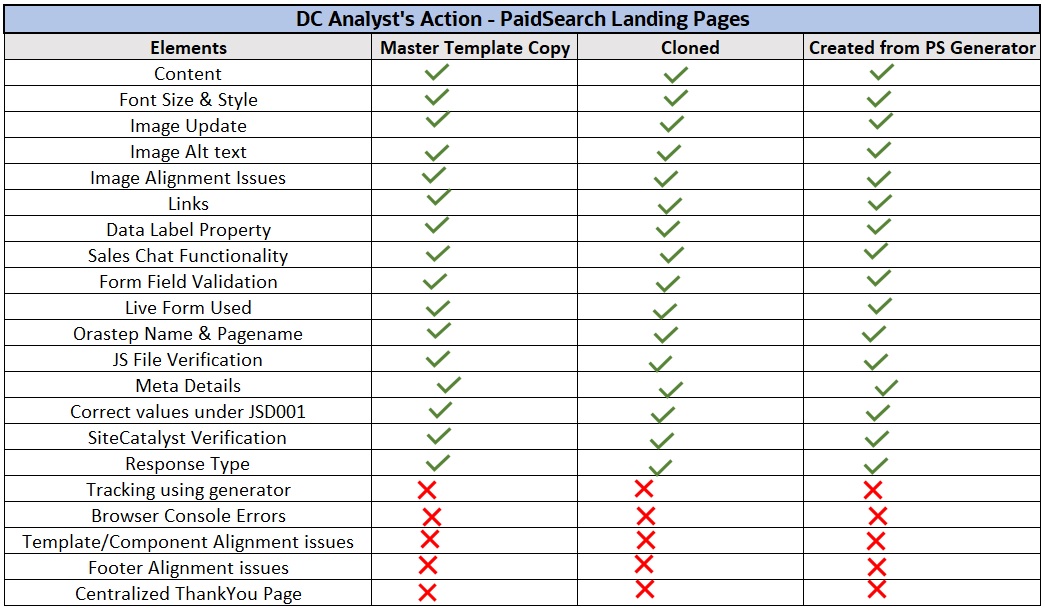
1. What elements should I ensure to include in my self-review?
Answer: To understand which elements are managed by analysts and when developers need to step in, please refer to the matrix:
2. QA finds an issue in the centralized Thank You page. Should I fix this issue?
Answer: QA will make a note as FYI to take appropriate action. Alert PM and development team to get it fixed.
3. Adobe Analytics variables are missing in my LP that is cloned. Should I submit the request for review with the missing variables?
Answer: All master templates are integrated with Adobe Analytics parameters. Whether the campaign is freshly copied from master template, created from the generator or cloned, ensure form submission is checked along with Abode analytical parameters before submitting to QA for review. Issues found will be marked as an M1 as these have a major impact on the campaign. Please note that Adobe analytical report is essential to understanding the campaign's performance
4. What are the most important parameters that I should ensure to update or verify in my self-review?
Answer: Whether the code is cloned from the master template or newly copied, parameters with high severity impact such as form submission, Abode analytical parameters, and variables in source code including page name and stepname, js scripts, thanks page id etc., if these parameters missing will fetch M1 issue.
5. The marketer provided an image which is non-standard size. What should I do?
Answer: Please ask the marketer for the correct size with good quality wherein rendering will not be a problem. Try to resize the image if possible without compromising on its resolution & quality.
6. I have resized the image to its ideal size, but there are a few minor (2–5 pixels) rendering issues on the smaller devices. Is it okay to ignore these?
Answer: We greatly appreciate your efforts in resizing! Let's ask the development team and PM for their advice. The QA team will assist by noting these rendering issues as FYI as well.
7. Translation obtained from SME has browser title in English instead of respective translated language. What is my next step?
Answer:: Please let the marketer know that this translation is missing. Retain the English browser title until you get an update.
8. The browser title is entirely out of context(for example, the cloning LP is about HCM, but the reference LP is about Database management). Should I make the title more appropriate?
Answer: Yes, before you begin cloning, it is expected that you will update the browser title with relevant text. To prevent M2 issues, always remember to verify the browser title.
9. What is my action on Console errors reported by the QA team?
Answer: Examine the error message to identify the cause and consult the guide for potential fixes. Please alert PM and development team on Thankyou page console errors or any unknown workaround to get these rectified.
10. I have been asked to clone a landing page but one of the links on the page leads to an error. Will QA report this as an issue?
Answer: Yes, Perform self-review and inform marketer beforehand on any issues that you encounter to avoid getting quality issues
11. The reference LP which I received to clone still has Maxyimizer script, should I remove it or retain?
Answer: Yes, please delete the script as the Maxyimizer is no more used.
12. Is it possible to link the Paid Search welcome page to the OCT centralized thankyou page?
Answer: Kindly notify the PM for their action
13. My landing page has a few rendering issues; should I fix them and how?
Answer: Regardless of whether LP is copied from the master or cloned request, rendering issues should be fixed. Refer to the workaround document and if the workaround does not resolve the issue, seek advice on its fix from PM and development team
Zoom Webcast QA Review Process
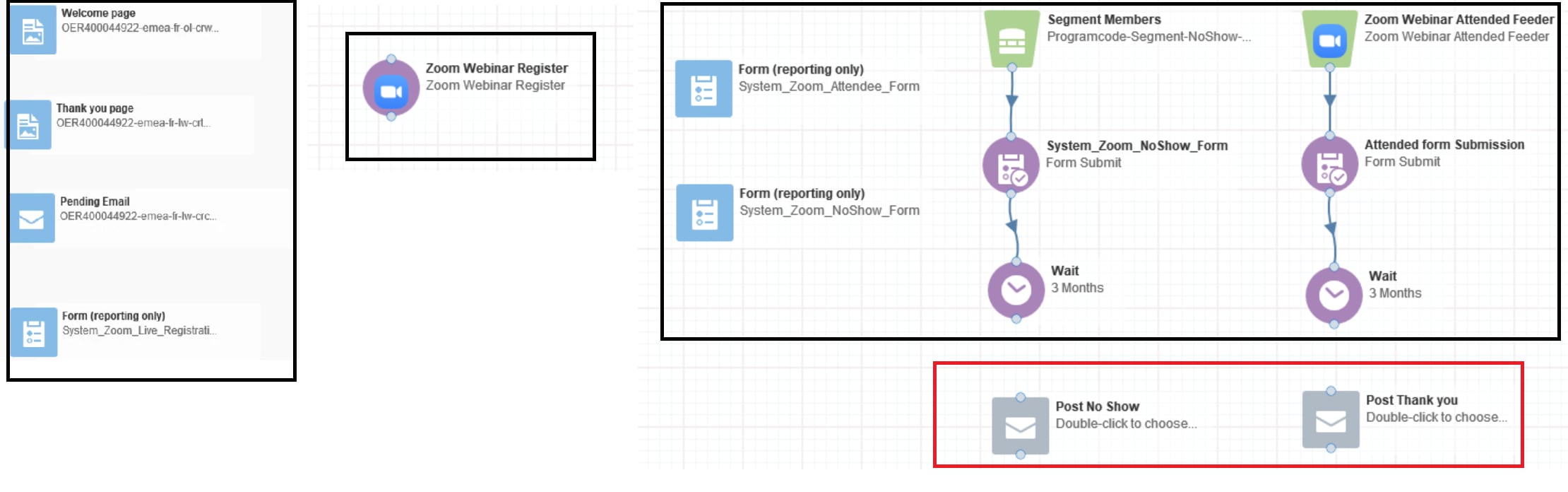
The below content describes the review process of the Zoom Webcasts, which includes both the event setup and the post-event setup.
The review of Zoom Webcast is divided into two phases and the details as below:
Phase 1
Event Canvas:
- Welcome Page
- Thank You Page
- Pending Email (for monitored registration)
- Canvas setup & association
Post-event Canvas:
- No Show Form Submission
- Attended Form Submission
- Canvas setup
- Canvas setup & association
Phase 2
Post-event Canvas:
- Thank You Email
- Sorry Email
- Canvas association
Snapshot below:
Phase 1 – highlighted in Black color and Phase 2 – highlighted in Red color
FAQs:
1. What will be the status of DQA after the Phase 1 review?
Answer: If Phase 1 is bug-free, then the status of DQA will be ‘Approved’, once the post-event emails are ready, you can change the status to ‘In Progress’.
2. The post-event emails are ready, how do I notify the QA team?
Answer: You can flag the request as high priority request through the group chat in slack(refer question How to create a Group Chat?). This request will be on top of priority.
3. There are no CTA buttons in my post-event Emails; Can I send both phases together?
Answer: Yes, both the phases will be reviewed at once. Mention in DQA to review both phases.
4. What information should we provide in the group chat?
Answer: The following information is required for a quick review.
Zoom Post Event
DQA Request number: DQA400000000
Direct link of post-event canvas: https://secure.p03.eloqua.com/Main.aspx#campaigns&id=244415)
Test emails of post-event
5. Should we send the test emails post-event emails?
Answer:Yes, it will help us for faster review, it might take a while for us to trigger and review the email.
6. What is the time frame expected for the QA review?
Answer: Zoom Webcast will be on top of priority. We will review the canvas at reasonably earliest, do not notify individually in slack after you receive the reply on assignment. Also, do not wait for the last minute or rush few minutes before launch, flag it as soon as it is ready.
7. The QA analyst who reviewed phase 1 logs-in other shift of the day, who will review phase 2 of my request?
OR
8. Another QA analyst who is not available on the group chat has reviewed phase 1, who will review now the phase 2?
Answer: Whoever is available to complete the review, will pick the phase 2.
9. Is there any time limit for me to flag the request to prioritize?
Answer: QA coverage will be provided across three time zones. Requests will be picked up by whichever QA analyst is available at the time to ensure timely support.
10. How to create a Group Chat?
Answer: Create a group chat in the slack messenger and ping the required information, please follow the steps to create the group chat in slack.
*Please note: this group chat is only for Zoom Phase 2 priority requests; any other requests are not entertained.
- Click on the plus icon to open new message
- Add the QA team members into message to create a group chat
- Now, the group chat is created, this will appear in the slack left sidebar.
Event Search Tool - User Guide
Event Search - Purpose
Oracle hosts numerous Events across the globe. The Event details can be found on oracle.com/search/events where customers can register to attend an Event. The Quality Assurance team conducts daily audits of Live Events—including In-Person Event, Virtual Event, and On-Demand Event—to ensure that data accuracy, process flows, and overall execution are error-free.
All observations are recorded in the APEX tool for the Production Analyst’s action.
Event Search Tool - User Guide
A communication is sent to respective production analyst’s action through an email
Quality Check of Live Events on Event Search

Steps
- To know more on the observations and action, click on the Apex tool link in the email, which will take you to the application.
- The report provides information such as the Event URL, Request number, Error found in the Event, Event date and Priority of the error.
- Take necessary action to fix the error in the Event and come back to the tool and intimate QA team for the validation.
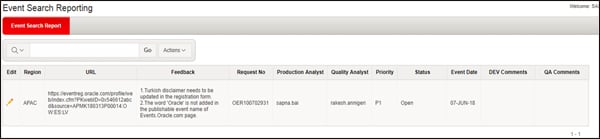
- Click on the edit(pencil) icon in the Report page
- Update Feedback page will be displayed
- Change the status accordingly, mention the comments in DEV Comments(if any).
- To save the changes, click on Apply button
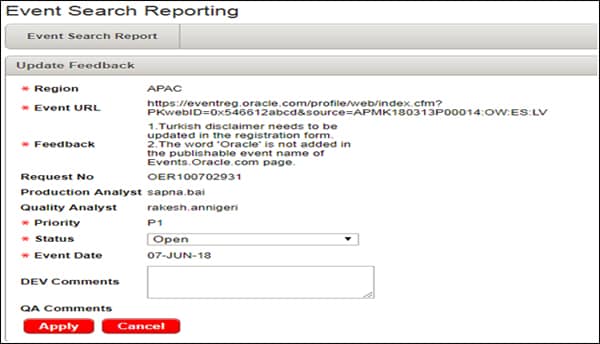
Please find more information in the video tutorial: https://otube.oracle.com/media/Event+Search+Review/0_wkuvz7t8/102044782
Microsite Bug Tracking Tool – User Guide
This user guide will help understand and follow the necessary steps required while using microsite bug tracking tool.
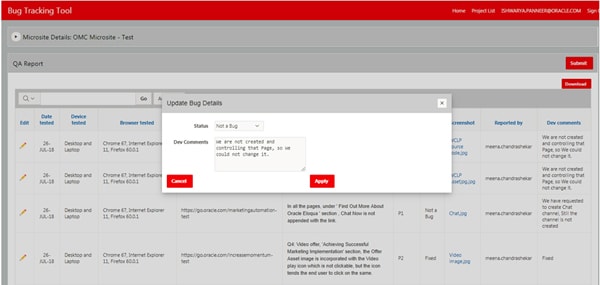
Microsite bug tracker is an APEX tool, which is used by Quality Assurance team to keep a track on all bugs/observations identified during testing of custom projects. This tool has 3 levels of access; a. QA access, b. Developer access, c. Project Manager access.
To begin with actions pertaining to a new project, all the details like project name, URL, type, language, project managers, developers & QA Engineer will be entered by the QA Engineer.
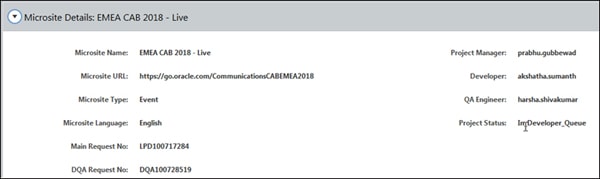
Once all the observations logged are submitted by QA, an email notification will be triggered to the developer and project manager associated with the microsite project to execute their respective action. Note, project manager will take action only on the records which states ‘For PM Review’
Follow the Steps below:
- Click on Click here link from received email notification which will open the QA Report in a browser.
- Navigate to edit pencil icon under each observation and click on it to add your comments in the text box and change the status accordingly by selecting from the dropdown list. Click on Apply button to save the changes.
- Once all the QA observations are fixed and addressed, click on Submit button to send the report back to QA team for validation.
- The QA bug reporting lifecycle will continue until the project is closed.